Chatbot App - AI Assistant
- 4.3
- Rating
- 5.00M
- Installs
- Free
- Price

 Analysis by App-foxy
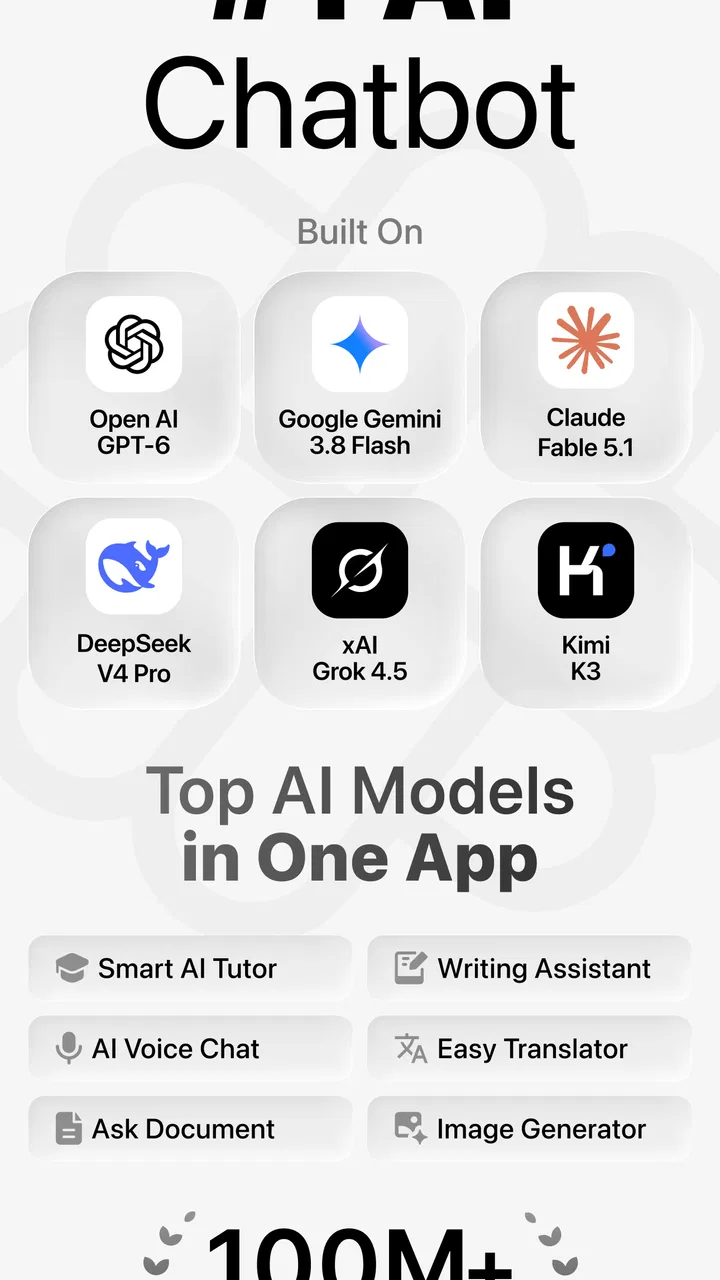
I tried Chatbot App - AI Assistant as a practical productivity tool rather than treating it like a novelty chatbot. Its main appeal is straightforward: it brings access to several well-known AI assistants into one mobile app, with GPT-5, Gemini, Claude, and other options presented for business-oriented tasks. In my experience, that makes it more useful when I want to compare answers or switch approaches without opening several separate services.
The app is developed by xStudios and is available for free, with optional in-app purchases ranging from $4.99 to $39.99 per item. That distinction matters. You can start without paying, but the free experience and the value of the paid options should be judged separately. I would not install it expecting every advanced capability to be available at no cost. I would install it to test whether having multiple AI assistants in one place genuinely improves my daily workflow.
How Chatbot App - AI Assistant fits into everyday work
This is a productivity app for people who use conversational AI to draft, organize, explain, summarize, or rethink information. The store positions it around business tasks, but I found the idea broad enough for studying, planning, writing messages, preparing meeting notes, and turning rough thoughts into something more usable.
You May Also Like

 Blood Strike: 2.5 Anniversary
Blood Strike’s Loadouts Turn Every Drop Into a Tactical Gamble
A close look at Blood Strike’s custom loadouts: how fast access to signature weapons reshapes its battle royale rhythm, rewards preparation, and narrows the gap between fights.

 Pandora - Music & Podcasts
Pandora’s Music Is Easy to Start, but Harder to Recover
Pandora’s strength is its low-effort path from a seed to a station. Its weak spot is how much confidence it asks you to place in connection, setup, and quiet recovery.

 8 Ball Pool
 Is Built on Rivalries, Rematches, and Routine
A close look at the rivalries, rematches, shared routines, and unanswered safety questions that turn a quick pool match into a persistent mobile community.

 Samsung Music
’s Quiet Strength Is Playing What You Already Own
Its reach comes less from spectacle than from dependable access to a personal library. That simplicity is both the app’s strongest retention engine and its ceiling.

 AccuWeather: Weather Radar
AccuWeather Review: A Quick, Clear Forecast for Everyday Decisions
For everyday plans, the best forecast is the one you can understand quickly. AccuWeather makes rain timing, radar, and local conditions easy to act on, with a few trade-offs.

 Hill Climb Racing
Why Hill Climb Racing Still Turns Crashes Into One More Run
A tiny car, a bumpy hill and one more upgrade: Hill Climb Racing keeps resurfacing because its simple chaos makes every near-miss feel personal.
More From Our News Desk



The most interesting part is not simply asking a chatbot a question. The practical advantage is choosing between different AI systems depending on the task. One may give a concise outline, another may produce a more natural rewrite, and another may be better suited to examining a complicated prompt. The app gives me a single starting point for that process instead of making me jump between unrelated applications.
That convenience is especially helpful on a phone. When I am away from a computer, I can open one app, describe what I need, and continue refining the result in the same general workspace. I still need to check the response carefully, but reducing the friction between asking, comparing, and editing is a real benefit.
Chatbot App - AI Assistant runs on Android devices using Android 7.0 or later, which gives it a fairly broad reach. It is rated for Everyone, so the basic audience is not limited to professionals. Still, its strongest use cases are people who already have a clear reason to use AI: writing support, research preparation, business communication, task planning, or idea development.
A realistic workday example
Imagine I have a short project update that sounds disorganized. I can paste the rough notes into the app and ask for a clean summary, then request a second version with a more direct tone. Instead of accepting the first answer automatically, I can compare how different assistants handle the same material. I might use one result for structure and another for wording, then make the final edit myself.
That workflow is more valuable than asking an AI to “write something good” with no context. I get better results when I explain the audience, purpose, length, and tone. For example, telling the app that a message is for a busy client and must contain a clear next step produces a more useful starting point than a vague request. The app is therefore best viewed as a drafting partner, not an automatic replacement for judgment.
A second useful scenario is meeting preparation. I can turn a list of concerns into an agenda, ask for likely questions, and request a short decision checklist. The important step is keeping the original facts visible while reviewing the generated material. AI can organize information quickly, but it can also make an uncertain suggestion sound more confident than it deserves.
Why access to several assistants can matter
Different models often approach the same prompt differently. That does not mean one is always correct, and it does not remove the need for verification. It does mean I can use disagreement as a signal. If one response recommends a particular approach while another highlights a risk, that contrast helps me inspect the issue instead of accepting the first polished answer.
For writing, I prefer asking for alternatives rather than a single “perfect” version. I might request a concise email, a warmer version, and a firm but respectful version. This makes the app useful for people who know what they want to communicate but struggle to find the right tone. It is also a good way to avoid the repetitive sound that can appear when every message is generated from the same template.
For planning, I get better results by asking the assistant to state assumptions and separate confirmed details from suggestions. That is one of my main practical tips for this app: use prompts that force the response to show its reasoning boundaries, even if the final answer is still something I must review. Asking for a checklist of missing information can be more useful than asking for a confident conclusion.
What the free starting point means
The app is free to install and use as a starting point, while optional purchases are available from $4.99 to $39.99 per item. I appreciate that this lets me test the basic experience before deciding whether it belongs in my routine. However, “free” should not be interpreted as a promise that every model, usage level, or advanced option is included without payment.
For occasional questions, light drafting, and personal experimentation, the free access may be enough to decide whether the interface suits me. For frequent professional use, the paid choices need a more careful evaluation. I would consider paying only after identifying a specific benefit, such as saving time across repeated tasks or making model switching genuinely easier. Paying merely because several AI names appear in one app would not be a strong reason by itself.
The purchase range is wide enough that the value depends on how often I use the app and what access each option provides. Since my needs may be different from another user’s, I would first test several real tasks rather than judge the app from one impressive answer. A polished demonstration is not the same as dependable daily value.
Where it saves time, and where it does not
The app can reduce the time spent opening multiple tools, rewriting prompts, and comparing styles. It is particularly convenient when I am on a phone and need a quick first draft. I also like the possibility of using one conversation to refine an idea through several stages: outline, rewrite, shorten, and turn into action items.
That said, AI does not eliminate editing. If the task involves names, figures, policy details, technical instructions, or sensitive business decisions, I still need to verify the output. The app can make a weak idea sound organized, which is useful for presentation but dangerous if I mistake fluency for accuracy.
Another trade-off is prompt preparation. The more specific I am, the better the result tends to be, but writing a detailed prompt takes time. For a very simple question, opening a normal search engine or a dedicated note app may be faster. Chatbot App - AI Assistant becomes more worthwhile when I need transformation, comparison, or back-and-forth refinement rather than a single fact.
Small workflow habits that improve the results
One habit I recommend is separating the task into passes. First, I ask for structure. Second, I ask the assistant to challenge gaps or unclear assumptions. Third, I request a final version for the intended reader. This is more reliable than asking for a finished document in one step, because I can catch problems before they become hidden inside polished prose.
Another useful technique is to keep the instruction and source material distinct. I place the notes first, then clearly explain what I want done with them. For example, I may ask for a summary that uses only the supplied notes and marks anything that requires confirmation. This does not guarantee perfect behavior, but it makes it easier for me to notice when the response goes beyond the material.
I also avoid sending confidential information casually. A business-focused chatbot can be tempting for contracts, customer messages, or internal plans, but convenience should not replace sensible handling of private material. I would remove unnecessary personal details and replace identifying information with neutral labels before using a draft as input.
A final tip is to compare outputs for purpose, not just style. The most fluent answer is not automatically the best one. I look for whether the response follows the requested format, preserves important qualifications, and gives me something I can act on. This approach makes the multi-assistant design more meaningful than simply choosing the answer that sounds most confident.
Limitations I noticed in the concept and experience
The biggest limitation is that putting several AI assistants together can create the illusion of certainty. If two tools produce similar wording, I may feel reassured even when both are working from the same incomplete prompt. Model variety is helpful for perspective, but it is not the same as independent fact-checking.
There is also a learning curve in deciding which assistant to use and how to phrase the request. Users who want one simple chatbot with no experimentation may find the choice unnecessary. A dedicated assistant can feel more focused, especially when someone already has an established account, history, or workflow elsewhere.
Mobile typing is another practical consideration. Long prompts, detailed source material, and substantial editing are less comfortable on a phone than on a desktop. The app is convenient for quick iterations, but I would not choose it as my only writing environment for a long report. I prefer using it to generate or improve material, then doing serious editing in a document editor.
Paid value also deserves caution. The presence of optional purchases does not automatically make them worthwhile. I would compare the cost with how much I actually use the app, whether the free version already covers my needs, and whether I need several assistants or only one dependable tool. Someone who uses AI once a week may gain little from paying, while a person handling repeated drafts every day could see a clearer return.
Who is most likely to benefit
I think the app suits freelancers, students, small business owners, office workers, and creators who regularly move between brainstorming and polishing. It is also useful for people who dislike committing to one AI system and want a convenient way to compare approaches. The broad Everyone rating makes it approachable, but the real benefit comes from having repeatable tasks that AI can help organize.
It can be especially helpful for someone who writes many similar but not identical messages. I can ask for different tones, shorter versions, clearer calls to action, or a more accessible explanation of technical material. The result is not ready to send without a review, but it can remove the blank-page problem and speed up the first draft.
Students may use it to turn a difficult topic into a sequence of questions, create a revision plan, or ask for an explanation at a simpler level. I would use it as a study aid rather than a shortcut around learning. Asking the app to quiz me, identify weak areas, and explain why an answer is wrong is more valuable than copying a finished response.
Business users should treat it as a support layer for communication and planning, not as an authority. It can help prepare a meeting or organize notes, but decisions involving legal, financial, medical, or security consequences require qualified human review. That is not a flaw unique to this app; it is a basic boundary of conversational AI that the convenient interface can make easy to forget.
Who should choose something else
I would skip it if I only need a basic notes app, a conventional search tool, or a simple to-do list. Adding AI assistants to a workflow that does not need drafting or analysis can make the process slower rather than faster. I would also hesitate if I already have one preferred AI service and rarely need a second opinion.
People who require a specialized professional system may be better served by software built specifically for their field. A general chatbot app can help with wording and organization, but it should not be treated as a dedicated accounting, legal, project-management, or research platform. The more important the source trail and auditability, the less suitable this kind of general assistant becomes as the main tool.
I would also skip paid access until I had tested the free experience with genuine tasks. The app is free to begin with, and the optional purchase range means there is no reason to decide from the name alone. If the free workflow does not save time, paying for more access is unlikely to solve the underlying mismatch.
My verdict after weighing convenience against cost
Chatbot App - AI Assistant is a sensible option for people who want several major AI assistants available from one productivity app. Its strongest value is convenience: I can compare responses, refine drafts, and switch approaches without making my phone workflow feel scattered. The free entry point makes experimentation easy, while the optional purchases leave room for heavier use.
My recommendation is conditional rather than automatic. Try it with three real tasks: rewrite a message, organize a messy set of notes, and challenge a plan by asking for risks and missing information. If the app consistently saves time and the multi-assistant format feels useful, paid access may be worth considering. If the results require as much correction as writing from scratch, or if one existing tool already does everything needed, keep the free version or skip it.
The app has a strong public reception, with an average rating of 4.8 from around 30 thousand ratings and over 500 thousand installs. It was released on November 15, 2024, and the current version is 9.0.2, so users should keep the app updated through their normal store process. Those figures suggest substantial interest, but they do not replace personal testing because AI usefulness depends heavily on the tasks, prompts, and standards each person brings.
For me, the deciding point is not the number of assistants listed inside it. It is whether that choice helps me work more deliberately. When I use clear prompts, compare outputs for meaningful reasons, protect sensitive details, and verify important claims, the app can be a practical mobile companion. When I expect it to produce unquestionable answers or replace a specialized tool, the trade-offs become much more obvious.
My final take: start free, use it on repeatable tasks, and pay only when the saved effort is clear. That makes Chatbot App - AI Assistant a good fit for curious, hands-on users who want flexible AI support, but a less convincing choice for anyone seeking a single-purpose tool with no need to compare or edit.
FAQs for Chatbot App - AI Assistant
01What features does the Chatbot App - AI Assistant offer?
The Chatbot App - AI Assistant offers a variety of features, including natural language processing to understand user queries, personalized responses based on user behavior, integration with other apps for seamless task management, and voice recognition capabilities. It also supports multiple languages, ensuring accessibility for a global user base.
02Is the Chatbot App - AI Assistant secure to use?
Yes, the app prioritizes user security and privacy. It employs end-to-end encryption to protect user data and has a robust privacy policy in place. Users can also customize privacy settings according to their preferences, ensuring that personal information is handled with the utmost care.
03Does the Chatbot App - AI Assistant require an internet connection?
Yes, the app requires an internet connection to function optimally. It relies on cloud-based processing to deliver accurate responses and stay updated with the latest information. However, some basic functionalities may be available offline, but for a full experience, an internet connection is recommended.
04Are there any subscription fees or in-app purchases?
The Chatbot App - AI Assistant offers a free version with basic functionalities. For advanced features, users can opt for a subscription plan, which provides access to premium services like expanded language support and more personalized interactions. In-app purchases might also include additional customization options.
05How user-friendly is the Chatbot App - AI Assistant for beginners?
The app is designed with a user-friendly interface that caters to both beginners and experienced users. It includes a simple onboarding process with tutorials to guide new users. The intuitive design ensures that users can easily navigate through features, making it accessible even for those not tech-savvy.
Pros
- Intuitive and user-friendly interface.
- Supports multiple languages seamlessly.
- Quick response time for queries.
- Customizable to suit user preferences.
- Regular updates with new features.
Cons
- Occasional errors in understanding context.
- Limited offline functionality.
- Subscription required for premium features.
- Consumes significant battery over time.
- May require data privacy considerations.

Chatbot App - AI Assistant
Gallery